Ilyas Salas — Automation & AI Specialist · Rabat, GMT+1

Projects

Four projects, explained in detail.

For each one: the problem, the solution and how it is built. Designed and built by me.

  1. 01AI customer support agent
  2. 02AI agent for driving schools
  3. 03Real-time lead validation
  4. 04AI lead qualification
AI agent · e-commerceProject 01

AI customer support agent

An agent that answers customers from the business's real data — and knows when not to answer.

  • n8n (self-hosted)
  • OpenAI
  • AI Agent · tool-calling
  • Agentic RAG
  • embeddings + vector store
  • Google Sheets

01The problem

In customer support, most contacts are the same few questions: where's my order, how do I return this, can I cancel. I handled them for over two years at Amazon, for the French market.

A typical chatbot handles them badly. Either it's too rigid and points to an FAQ, or — with a poorly constrained language model — it invents a plausible answer: a fake tracking number, a return policy that doesn't exist. In support, a made-up answer costs more than no answer.

02The solution

A conversational agent that answers only from the business's own data. It looks up the order live, searches the store's policies (returns, cancellations, shipping), and keeps context from one question to the next.

When a request shouldn't be handled by AI alone — a refund, a cancellation, a complaint — it promises nothing: it logs the escalation for the human team and tells the customer clearly.

03How it's built

  • n8n Chat Trigger (self-hosted): the entry point of every conversation.
  • AI Agent with tool-calling (OpenAI): the model decides whether to call a tool, and which one.
  • Agentic RAG: searching the policies is a tool the agent chooses to use, not a step forced on every message. A “hello” or an order number doesn't trigger a pointless document search.
  • Same embedding model for ingestion and retrieval: documents and questions are embedded by the same model — otherwise the vectors aren't comparable and retrieval returns noise.
  • Order lookup tool: reads Google Sheets live, by order number.
  • Escalation tool: writes the request (type, order, summary) to a dedicated log that the human team works from.
  • Per-session memory: follow-up questions (“so when will it arrive?”) keep their context.
  • Anti-fabrication framing: the agent answers only from its tools' results; if the information is missing, it says so.

04The result — what it proves

Tested end to end across three kinds of scenario — order lookup, policy question and escalation:

ScenarioExpected behaviourResult
Order lookupGives the order's real status from the data; if the order doesn't exist, says so instead of inventing one.✓ Tested
Policy question (RAG)Answers from the passages retrieved from the store's policies; if the answer isn't there, says so.✓ Tested
Refund, cancellation, complaintDoesn't act alone: writes the escalation to the log, then tells the customer.✓ Log checked

These tests were run by me on a demo store, with fictional orders — this is not an external audit.

What it proves: a useful support agent isn't the one that answers everything — it's the one that knows when not to, and leaves a trail when it hands off.
AI agent · driving schools · demoProject 02

Conduite Atlas — AI agent for driving schools

An assistant that answers prospective students outside opening hours and books their appointments — without ever inventing an answer.

  • n8n
  • AI Agent · tool-calling
  • OpenAI
  • RAG
  • PostgreSQL + pgvector
  • Google Calendar
  • Google Sheets

01The problem

A driving school's front desk covers its opening hours. But prospective students compare schools in the evening, on Sundays, or when the line is busy — and the first school to answer usually gets the student.

02What it does

  • It answers from the school's own information (RAG): enrolment, prices, financing, the highway code, lessons, the exam, opening hours…
  • It never makes anything up: if the information isn't there, it says so.
  • It captures leads: a first name and contact details, then a callback from a human.
  • It books appointments in Google Calendar and refuses slots already taken.
  • It protects personal data: no access to student files.

Built for a fictional French driving school, as a demo of what I deliver to real ones.

Automation · leadsProject 03

Real-time lead validation pipeline

Every lead checked the moment it arrives — and every rejection logged with its reason.

  • Make.com
  • Webhooks
  • Numverify
  • MillionVerifier
  • HubSpot
  • Google Sheets

01The problem

Ad lead forms (Facebook, Google) push everything into the CRM unfiltered: placeholder numbers like 07000000000, mistyped or disposable emails, duplicates, empty fields.

The result: sales reps call leads that never existed, email sequences bounce on the first send — and when a client questions lead quality, the agency has no data to back itself up.

02The solution

A pipeline that sits between the form and the CRM. Every submission goes through a series of real-time checks: valid leads are created in HubSpot, the rest are blocked and logged with the exact reason and the campaign they came from.

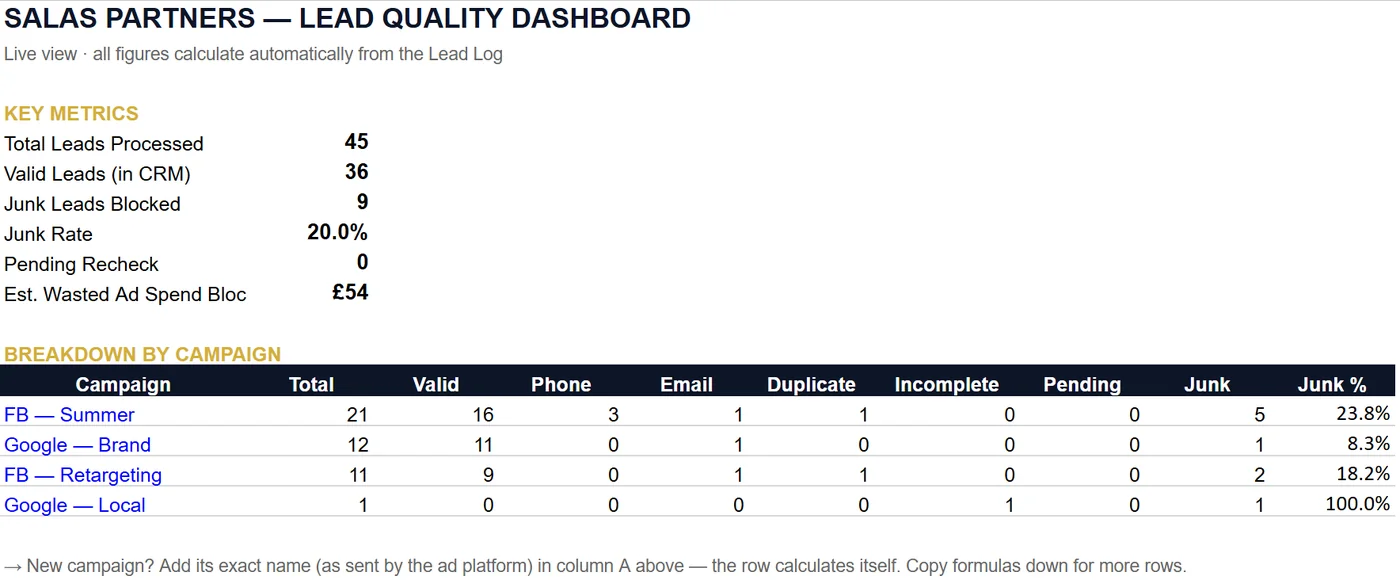
A dashboard calculates itself from the log: overall and per-campaign junk rate, plus an estimate of wasted ad spend.

03How it's built

  1. Completeness
  2. Duplicate (HubSpot)
  3. Number format
  4. Real number (Numverify)
  5. Deliverable email
  • Make.com webhook that runs the moment data arrives, then field normalization and phone formatting before any check.
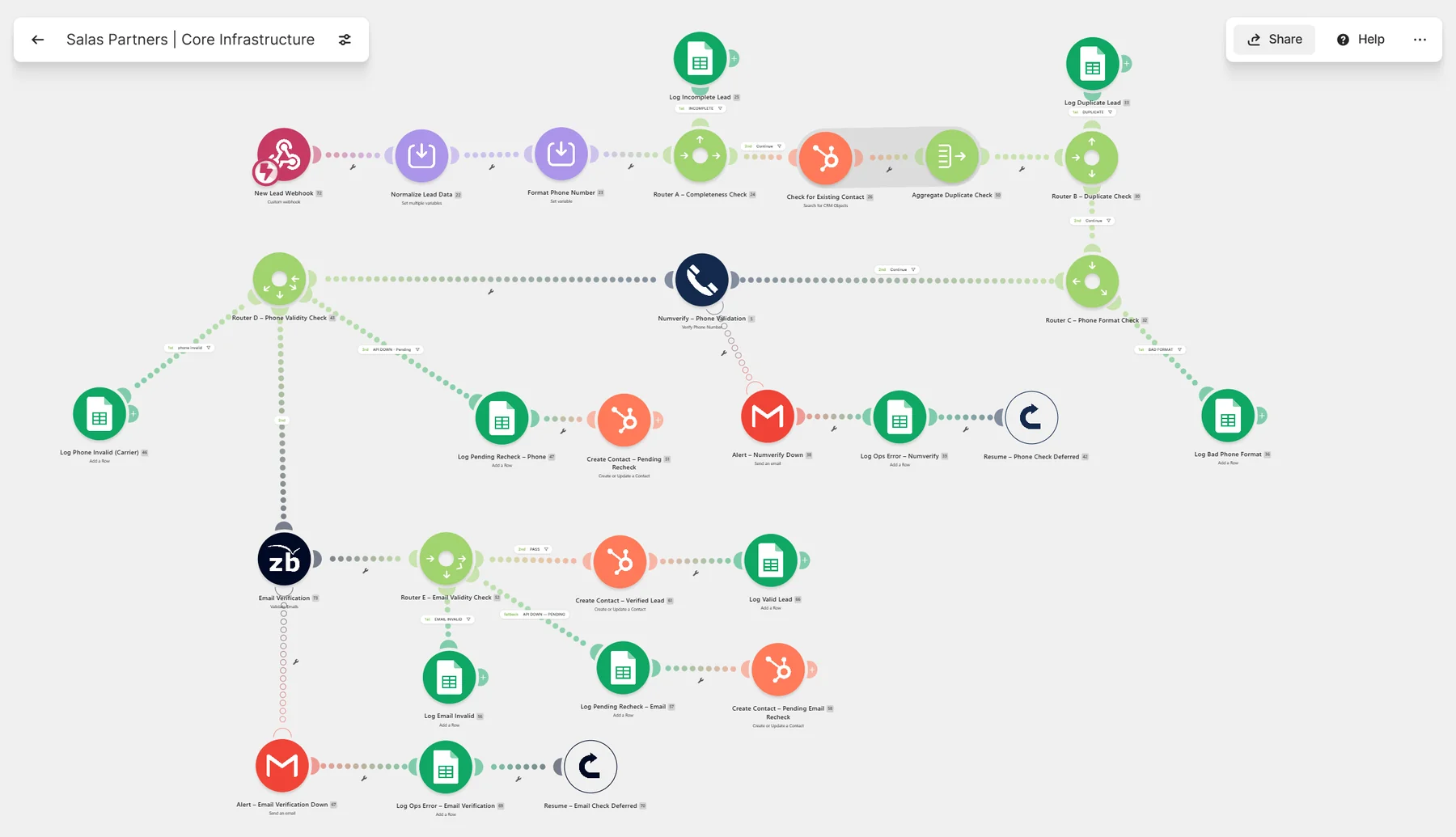
  • Checks cascade from cheapest to most expensive: the free checks (missing fields, HubSpot duplicate, format) run before the paid API calls. An incomplete lead never burns a verification credit.
  • One router per check: every failing branch writes a row to the log, with the failure type and the reason.
  • Resilient to API outages: if the phone or email verification service doesn't respond, the lead isn't lost. It's created in HubSpot with a “pending recheck” status, an email alert goes out, the error is logged, and a Resume directive lets the scenario carry on. The trade-off is deliberate: during an outage an unverified lead does enter the CRM — but flagged, so it is easy to recheck afterwards.
  • Structured Google Sheets workbook: Lead Log, Dashboard, Config, Errors, Alerts Sent — plus a Read Me tab and a setup guide for handover.
The Make.com scenario for the validation pipeline, with its check routers, logging modules and recovery branches.
The full Make.com scenario: check routers, logging, and recovery branches for API outages. Click to enlarge.

04The result — what it proves

On a test set of 45 leads simulating ad form submissions:

Test data I built myself to stress the pipeline (UK format: 07… numbers, pounds sterling). No real client data, and no client results to report.

45leads processed
36valid, created in HubSpot
9blocked before the CRM
20%junk rate detected

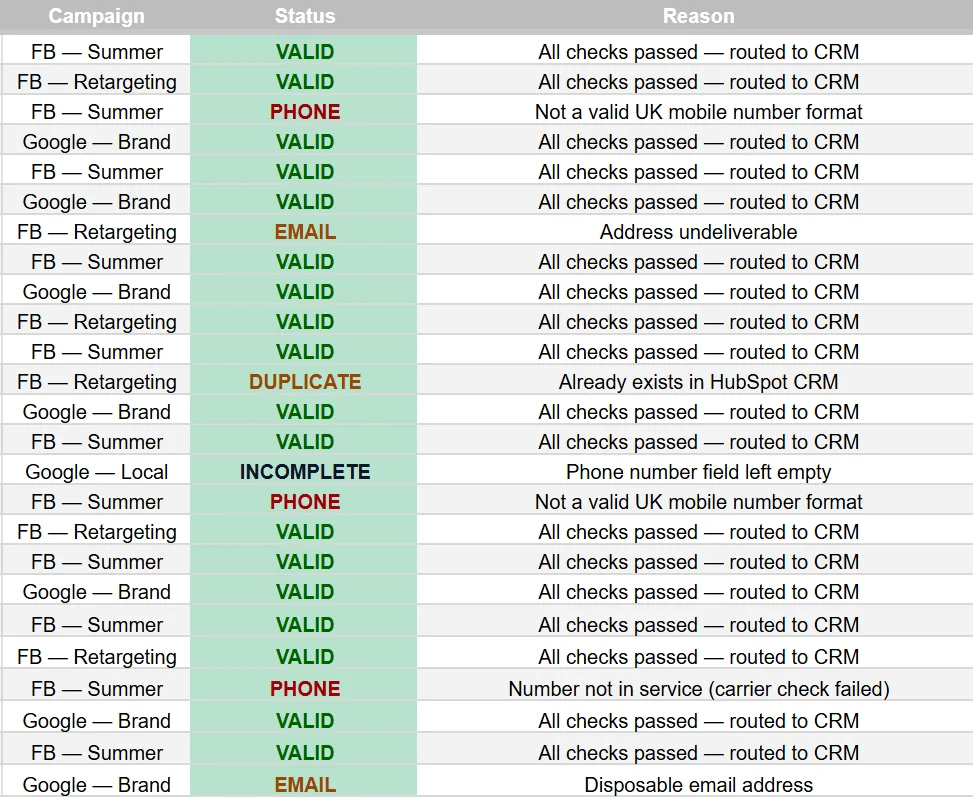
Every rejection carries a readable reason: Not a valid UK mobile number format, Number not in service (carrier check failed), Disposable email address, Already exists in HubSpot CRM, Phone number field left empty.

Lead quality dashboard: 45 leads processed, 36 valid, 9 blocked, 20% junk rate, breakdown by campaign.
Dashboard calculated automatically from the log.
Log excerpt: campaign, status (VALID, PHONE, EMAIL, DUPLICATE, INCOMPLETE) and the reason for each decision.
The log: status and reason for every lead.

What it proves: production-grade error handling. An API outage loses no leads, and every decision the system makes is traceable.

05Demo

Two minutes, on a real form submission sent through the system: a fake number blocked and logged, then a valid lead synced to HubSpot in real time. (Recorded on the UK version of this project.)

AI + CRM · leadsProject 04

AI lead qualification pipeline

AI reads every inbound request, scores it and routes it — so sales reps call the right prospects first.

  • Make.com
  • OpenAI API
  • Structured JSON
  • HubSpot
  • Gmail
  • Google Sheets
  • Tally

01The problem

An agency gets inbound requests of wildly varying quality: a well-defined ERP–CRM sync project lands next to “how much for a cheap website?”.

Someone has to read them one by one, guess budget and urgency, then decide who to call back. Meanwhile, hot leads wait in the same queue as vague requests — and go cold.

02The solution

Every request submitted through the Tally form is analysed by AI in seconds: a 0–100 score, industry, urgency, estimated budget, a one-sentence summary, positive and negative signals, and a recommended action.

The lead is then routed automatically: enriched contact in HubSpot, instant alert for hot leads, a personalized reply to the prospect, and every decision logged.

03How it's built

  • Tally webhook → Make.com: the scenario starts when the form is submitted.
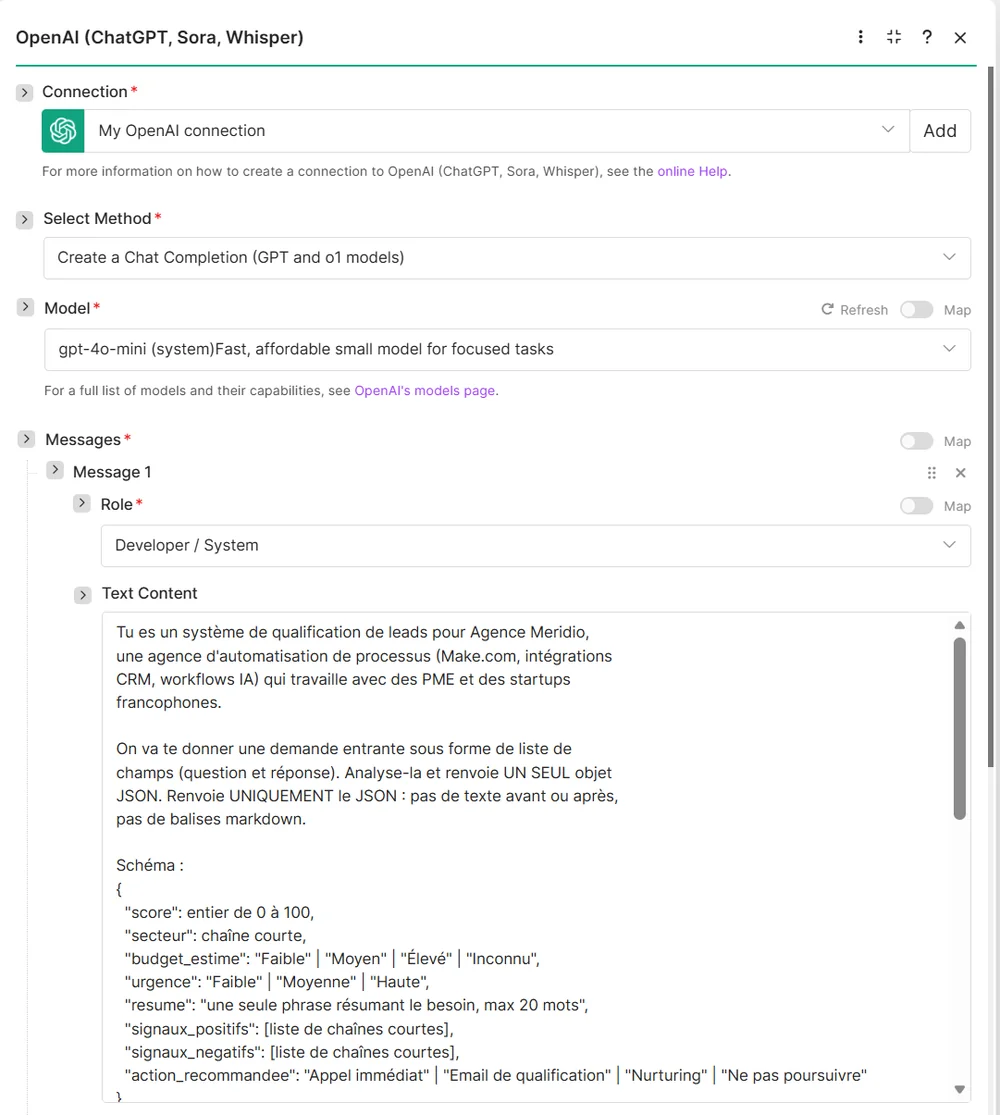
  • OpenAI (gpt-4o-mini), framed by a JSON schema defined in the system prompt: score, secteur, budget_estime, urgence, resume, signaux_positifs, signaux_negatifs, action_recommandee — with enumerated values (“Faible” | “Moyen” | “Élevé” | “Inconnu”). The AI doesn't produce free text; it produces data a workflow can act on.
  • JSON parsing, then normalization of the variables before any decision. The schema is set by the prompt, not enforced by the API — the parsing step is what checks the output is usable.
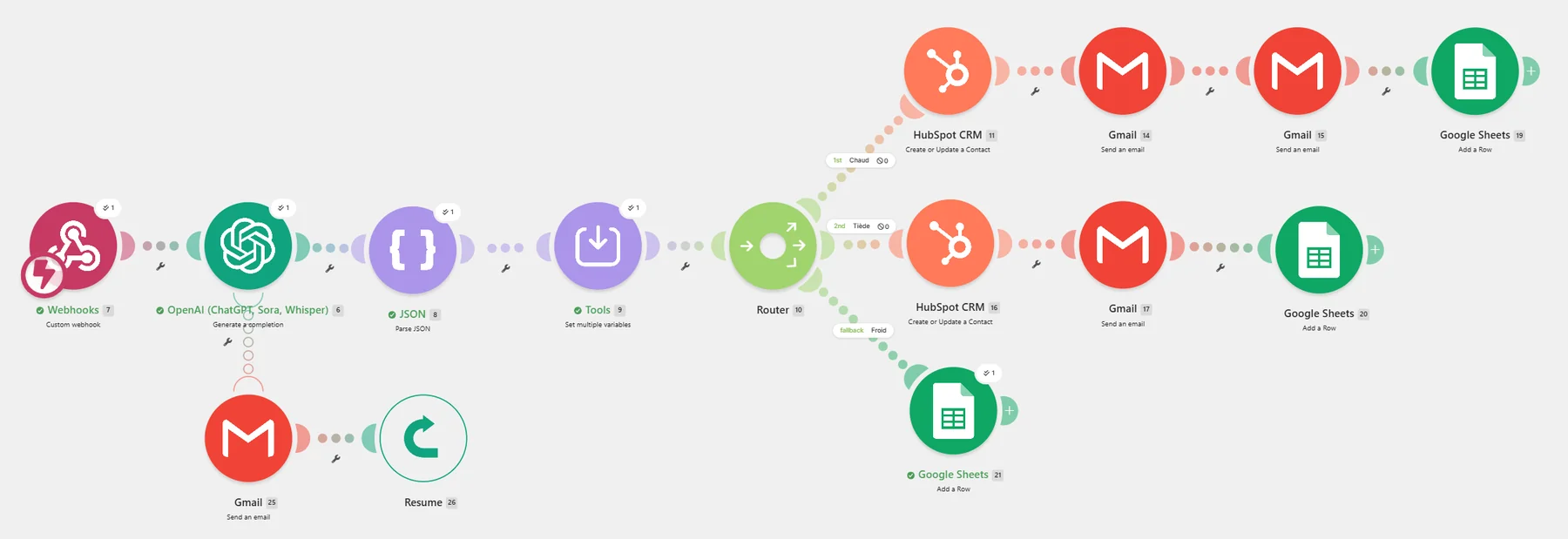
  • Three-way router, detailed below.
  • Custom HubSpot properties (AI Score, AI Summary, Urgency): reps sort directly in their CRM.
  • Error handling on the OpenAI call: on failure, an alert email then a Resume directive — the scenario doesn't stop.
RouteWhat happens
HotContact created in HubSpot · instant email alert · personalized reply to the prospect · log row
WarmContact created in HubSpot · personalized reply to the prospect · log row
ColdLog row only (default route)
Make.com scenario: webhook, OpenAI, JSON parsing, variables, and a three-way router to HubSpot, Gmail and Google Sheets, with a Gmail-then-Resume error route.
The Make.com scenario: OpenAI analysis, JSON parsing, hot / warm / cold router, and an error route on the OpenAI call.
OpenAI module configuration: gpt-4o-mini model and a system prompt that enforces a JSON schema.
The system prompt (in French, for a French-speaking agency): the expected JSON schema, with enumerated values.

04The result — what it proves

Across 9 test requests, from precise projects to vague enquiries (AI summaries translated from French):

“Agence Meridio” is a fictional agency I created to build and stress-test this pipeline. The requests, names and scores below are test data.

Request (AI summary)ScoreRouteRecommended action
Automating the sync between ERP and CRM for 150 orders/day100HotCall immediately
Urgent automation of contact creation and routing from a form…85HotCall immediately
Building an automatic dashboard that compiles sales from several sources70HotQualification email
Automated sorting of incoming emails with AI60WarmCall immediately
Atelier CD wants better client follow-up and reminders30ColdQualification email
Kevin wants to automate processes but has no clearly defined need25ColdQualification email
Vague question about pricing with no concrete description of the need15ColdDon't pursue
Looking for someone to build a low-cost website10ColdDon't pursue
The description of the need is too vague0ColdDon't pursue

All 9 requests, unfiltered. The route is computed from the score; the recommended action is a separate judgement by the AI. Both are recorded, and they can disagree — as on the 70 and 60 rows.

Google Sheets log: score, urgency, budget, route, summary and recommended action for each test request.
The Google Sheets log for the 9 test requests (in French).

What it proves: using a language model as a reliable component inside a system — structured output, controlled values, and error handling for when the model fails.

05Demo

The screenshots above come from the real system. Want to see it run on a request you write yourself? I'll demo it live.